
WhatsApp Business API vs. WhatsApp Business App: What's the Actual Difference?
Most business owners assume "WhatsApp for business" is one thing. It isn't. The free WhatsApp Business App and the paid WhatsApp Business API are genuinely different products built for different stages of a business — and picking the wrong one wastes either money or growth potential.
If you've searched this, you've probably found a lot of confusing, half-explained answers. Let's actually fix that — starting with what each product really is, not just the name.
What Is the WhatsApp Business App?
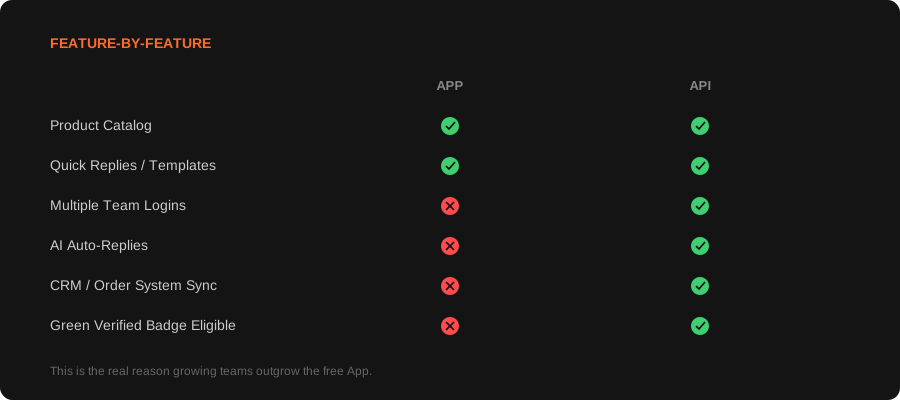
This is the free app you download from the app store — essentially a business-focused version of regular WhatsApp. It adds a business profile, a basic product catalog, quick replies, and simple away messages. It's built to be installed on one phone and used by one person.
What Is the WhatsApp Business API?
The API isn't an app you install at all — it's a backend connection that lets your actual business systems (a website, a CRM, a support tool, or an automated chatbot) send and receive WhatsApp messages programmatically. It's built for volume, teams, and automation, not a single person tapping away on their phone.
The Cost Difference, Explained Properly
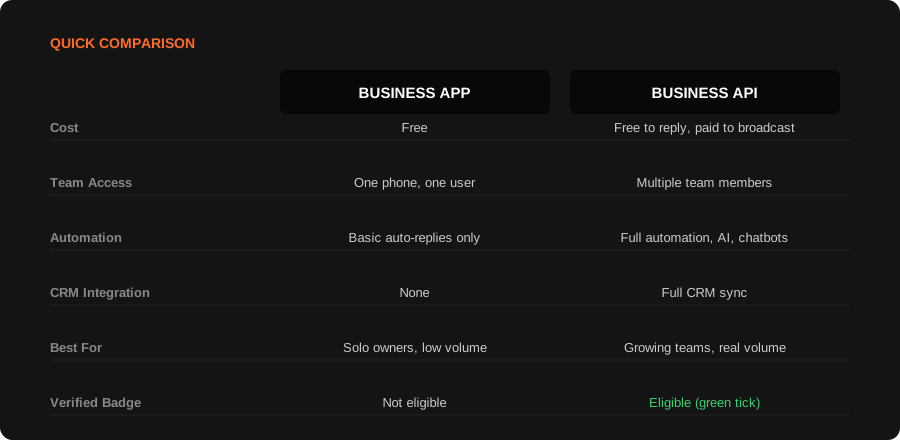
The Business App is genuinely free, always. The API is not priced per conversation — Meta actually retired that model in 2025. Here's how it really works: when a customer messages you first, everything you reply within that 24-hour window is completely free and unlimited, no matter how many messages or team members are involved. That's exactly why using the API to handle and automate inbound chats — the way most businesses actually use it — doesn't rack up per-message fees from Meta on its own.
The real costs come from three places instead: messages you initiate, like promotional broadcasts, billed per message and varying by country and category; your BSP platform fee — whatever tool actually runs the API, such as Interakt, Gupshup, or Twilio, which charges its own subscription or markup; and the setup/configuration cost if you work with an agency to connect it properly to a CRM, build automated flows, and set up templates, similar to how our WhatsApp Business API setup works.
One thing worth watching: Meta has announced that starting October 1, 2026, even those free service-window replies will begin being billed per message — a real, upcoming change worth factoring into any long-term budget for this.
The honest way to think about it: you're not just paying for messaging, you're paying for the infrastructure that lets messaging actually scale past what one person can handle.
The Growth Path Most Businesses Actually Take
Almost nobody starts on the API. The typical journey looks the same across most industries: start on the free App while volume is low and manageable, hit a point where messages are being missed or a team can't keep up manually, then migrate to the API once that pain is real and specific — not hypothetical.
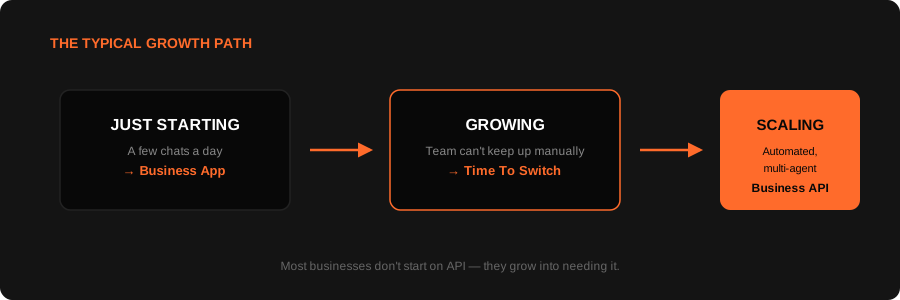
There's no shame in starting on the free App. The mistake is staying on it well past the point where it's quietly costing you leads — every missed or delayed WhatsApp reply is a real customer interaction lost, the same way a broken conversion path on your website quietly costs you customers without an obvious alarm going off.
So Which One Do You Actually Need?
A simple, honest way to decide:
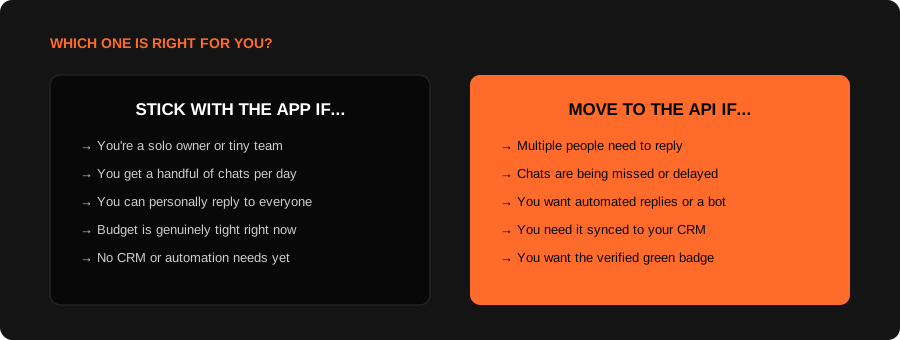
The wrong choice isn't picking the App too early — it's staying on it long after it's actually costing you customers.
What Migrating Actually Involves
If you decide it's time to move, the process generally involves verifying your business with Meta, migrating your existing number off the standard app, connecting the API to whatever systems you want it feeding (a CRM, a chatbot, an order system), and setting up message templates for anything automated. None of these steps are especially hard individually, but getting the sequence wrong is a common way businesses end up with downtime on a number their customers already know and trust — which is exactly the kind of thing worth having proper guidance for rather than figuring out live.
If this sounds like where your business actually is right now, here's exactly what our WhatsApp Business API setup includes, and how it ties into a broader performance marketing strategy where WhatsApp becomes a real conversion channel, not just a messaging app.
Frequently asked questions.
Not entirely, but it's closer to free than most people assume. Replying to customers who message you first is free and unlimited within a 24-hour window — that covers most day-to-day support and sales conversations. Costs come from messages you initiate yourself (like promotional broadcasts), your BSP platform fee, and any agency setup cost. Starting October 2026, Meta has announced even free replies will begin being billed, so this is worth watching going forward.
Yes, and this is actually the most common path. Most businesses start on the free app and migrate to the API once they outgrow it — you don't need to commit to the API from day one.
In most cases, your existing number can be migrated to the Business API, though it needs to come off the standard WhatsApp or Business App first. This process has specific steps that are easy to get wrong without guidance.
The green checkmark is WhatsApp's official business verification badge, only available through the Business API after Meta approves your business. It's not required to use WhatsApp for business, but it does add a real trust signal for customers who are wary of scam accounts.
The Business App doesn't have a hard messaging cap in the same way the API's pricing does, but it's built for one person managing conversations manually — realistically, it becomes unmanageable well before any technical limit matters.
No. It's genuinely useful for any growing business handling enough WhatsApp volume that one person can't keep up manually, or that wants automation, CRM sync, or multiple team members responding — this can apply to a small team, not just an enterprise.
Let's Set Up WhatsApp API The Right Way.
Verified number, connected CRM, and automation that actually fits how your team works — set up properly the first time.