
How Much Should You Spend on Google Ads? A Real Budget Guide for Small Businesses
The honest, no-fluff answer: most small businesses should start with at least $1,000 to $1,500 a month in actual ad spend — not because that number is magic, but because below it, Google's system rarely has enough data to figure out who's actually worth showing your ad to.
If you've searched this question before, you've probably noticed everyone gives a different answer. That's not because people are guessing — it's because Google Ads budgets genuinely depend on a few things that vary a lot from business to business. Let's actually break down where the numbers come from, why they change by industry, and how to know if you're spending too little, too much, or just enough.
Why There's No Single "Right" Google Ads Budget
A few things genuinely shift the number, no matter who's telling you what to spend:
- Your industry's cost-per-click. A plumber searching "emergency plumber near me" might pay $6 to $12 per click. A B2B software company bidding on enterprise keywords can pay $30, $50, even more.
- How competitive your local market is. The same service in a major city usually costs more per click than the same service in a smaller town, simply because more businesses are bidding for the same searches.
- What you're actually trying to achieve. A budget built to "get some leads" looks very different from a budget built to hit a specific number of bookings this month.
We've seen this play out differently across the 25+ industries we've worked in — there's genuinely no universal number, only a universal method for finding your own.
Ad Spend vs. Management Fees: Know the Difference
This trips up a lot of business owners early on, so it's worth being direct about it. When you run Google Ads, there are two separate costs:
- Ad spend — the money that goes directly to Google every time someone clicks your ad. This is entirely separate from anyone managing your account.
- Management fees — what you pay a person or agency to actually build, run, and optimize the campaigns.
If a budget quote seems to include both, ask directly which portion is spend and which is the fee — it changes the math completely. If you want to see exactly what's included in a properly run account, here's how our Google Ads management works.
How Much Should You Spend, By Campaign Type?
Google Ads isn't one single thing — it's a handful of different formats, and each one has a different relationship with budget.
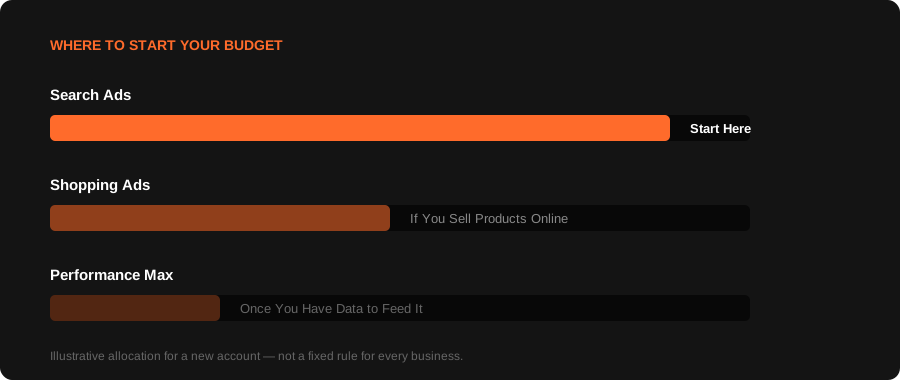
Search Ads
This is the classic text-ad-at-the-top-of-results format. It's usually where new advertisers should start, since it captures people who are already searching for exactly what you offer.
Shopping Ads
If you sell physical products online, Shopping campaigns often deliver a better return than Search for the same budget, since they show your actual product, price, and image directly in results.
Performance Max
Google's newer, AI-driven campaign type spanning Search, Display, YouTube, and Gmail from one budget. It needs enough data to learn properly — usually not the best place to start with a very tight budget.
For most small businesses just getting started, we'd suggest concentrating budget on Search first, then expanding once you have real data to work from. And if you're weighing this against a completely different channel, like whether Meta Ads might suit your business better, that's a genuinely separate budget conversation worth having early.
Signs Your Budget Is Actually Too Low
- Your campaigns are stuck "limited by budget" in Google Ads — this is a real status Google shows you directly
- You're seeing very few clicks, even on keywords with decent search volume
- Performance seems to reset every few days instead of steadily improving, because there's never enough data building up between budget resets
If any of these sound familiar, the problem often isn't your strategy — it's that the budget hasn't given the algorithm enough room to actually learn.
Signs You're Ready to Spend More
- Your existing campaigns are consistently profitable, and you're leaving demand on the table
- You've validated which keywords and campaign types actually convert, and now it's a question of scaling what already works
- Your business can genuinely handle more leads or orders without the operational side breaking down
The mistake isn't starting small. The mistake is expecting big results from a budget that never had a fair chance to prove itself.
A Realistic Starting Framework
If you want a genuinely practical starting point rather than a guess:
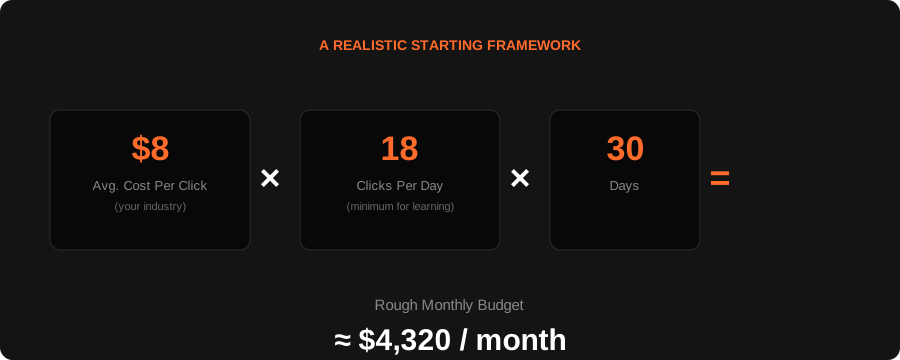
- Look up the average cost-per-click for your industry and main keywords (Google's own Keyword Planner gives a rough estimate, free with any Google Ads account)
- Multiply that by roughly 15 to 20 clicks a day as a bare minimum for the algorithm to start learning meaningfully
- That gives you a rough daily minimum — multiply by 30 for a monthly figure
For a lot of local service businesses, this lands somewhere in the $1,000 to $2,500/month range. For competitive B2B or high-ticket industries, it can be considerably higher. There's no shame in starting smaller and scaling once you see real signal.
Frequently asked questions.
Technically, Google will let you run campaigns on almost any budget, even $5 a day. Realistically, below roughly $1,000 per month in actual ad spend, most businesses see inconsistent results simply because there isn't enough data for the system to optimize effectively.
Not necessarily a huge one, but a fair one. A budget that's too small to gather meaningful data will often make Google Ads look like it doesn't work, when the real issue is that it never had a genuine chance to.
Keep them mentally separate. Your ad spend goes to Google regardless of who manages your account. Management fees are a separate cost for the strategy, setup, and ongoing optimization work.
Search campaigns typically show directional signal within 2 to 3 weeks. Full account maturity, where targeting and Quality Score are properly optimized, is usually a 60 to 90 day story, not a first-week judgment.
Starting at a level that at least clears the enough-data-to-learn threshold is usually smarter than starting too small and writing off the channel based on an unfair test. You don't need to start at your ceiling, you just need to start above the floor.
Get A Straight Answer, Not A Generic Number.
A proper account audit tells you exactly where your budget should sit, based on your actual industry and market — not a rule of thumb.